

Your staff member just left, and their inbox full of client answers went with them, leaving you to recreate conversations about transactions you closed months ago. Generic client management software for small business wasn't built for the compliance requirements and ledger integrations accounting firms actually need. Here are 15 options purpose-built for bookkeepers and accountants who want client conversations attached to transactions, not buried in email threads that vanish when people leave.
TLDR:
- Client management software for accountants connects to QuickBooks or Xero for transaction-level communication and document requests.
- Security features like audit trails and role-based access meet Gramm-Leach-Bliley Act compliance requirements for financial data.
- Purpose-built systems save 30-50% on close time by eliminating email fragmentation and context switching.
- Pricing models vary: per-user fees penalize growth while per-client pricing aligns with how firms bill.
- Double offers month-end close management starting at $10 per client monthly with AI bank feeds and client portals.
What Is Client Management Software for Accountants and Bookkeepers
Client management software for accountants and bookkeepers handles coordination between firms and clients during the close process. Unlike CRM tools built for sales pipelines, these systems connect directly to ledger data in QuickBooks or Xero. When a bank transaction needs clarification, you ask the question where you're working, your client responds through a secure portal, and you code the transaction without switching tabs or copying data manually.
Why Security Matters More for Accounting Client Management

Accounting firms handle data with legal consequences: social security numbers, bank credentials, tax returns, and proprietary financial records. The Gramm-Leach-Bliley Act requires firms to safeguard customer data, creating compliance obligations that generic project tools weren't built to meet. Modern accounting firm security practices now include encryption, continuous staff training, and threat detection as baseline requirements.
Audit trails trace who accessed documents, when edits occurred, and how information moved between parties. Role-based access controls share specific account details with junior staff while restricting full visibility to partners. Multi-factor authentication and encryption protect data in transit, but one compromised login could expose years of financial records across your practice.
Core Features Accounting Firms Need in Client Management Software
Transaction-level communication ties discussions to specific ledger entries. When a Stripe charge looks unfamiliar, you flag it inline and the client receives a link to that exact transaction, keeping context attached to the entry instead of scattered across email.
Document request workflows track outstanding items and automate reminders. Request a W-9, set a deadline, and schedule follow-ups if nothing arrives. The system shows which clients owe documents across your practice.
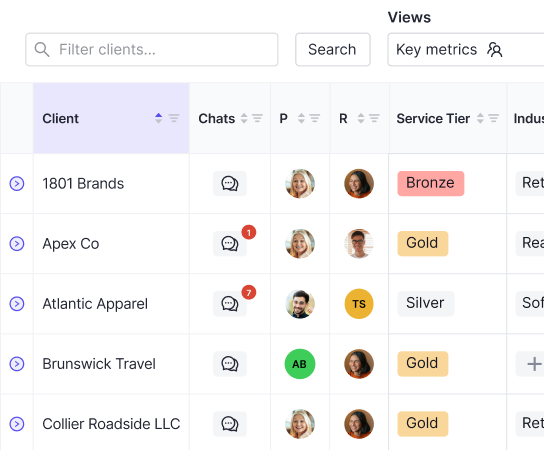
Multi-client handling supports different service tiers within one book of business. Client A receives basic cash-basis work while Client B runs accrual schedules, each matched to their needs without forcing identical workflows.
The Hidden Cost of Fragmented Client Communication
Switching between email, text messages, and spreadsheets fragments knowledge across your practice. When client answers live in texts sent to staff who've left, you recreate analysis instead of referencing history. Research from Fierce, Inc. shows that 86 percent of employees and leaders cite poor communication as a major cause of workplace failure, and scattered client conversations prove it daily across accounting firms nationwide.
15 Best Client Management Software Solutions in April 2026
Purpose-Built for Accounting Firms
Double connects directly to QuickBooks Online and Xero to execute close tasks where ledger data lives. AI bank feeds, accruals, reconciliations, and client portals replace spreadsheets with automated workflows. Starting at $10 per client monthly with no user fees. It's best for bookkeeping and CAS practices serving 10-200 clients seeking 30-50% time savings.
Karbon organizes workflow and communication for accounting firms managing tax, audit, and advisory services. Email integration surfaces client conversations alongside task lists. Starts around $59 per user monthly. Best for full-service firms needing centralized communication.
Financial Cents handles client onboarding, billing, and document collection for bookkeeping practices. Proposal templates and automated workflows standardize client acquisition. Pricing begins at $50 monthly. Best for solo practitioners professionalizing operations.
Adaptable CRM Solutions
HubSpot CRM tracks leads and manages sales pipelines with free basic features. Contact management, email tracking, and deal stages work for firms treating client acquisition systematically. Free tier available; paid features start at $20 monthly per seat. Best for firms focused on new client growth.
Zoho CRM offers customizable modules covering contacts, deals, and workflow automation. Accounting-specific customization requires setup effort. Free for three users; paid plans start at $14 per user monthly. Best for budget-conscious small firms willing to configure.
All-in-One Practice Management
Canopy combines tax practice management with client communication and document handling. Built for tax-focused firms needing deadline tracking and organizer distribution. Pricing starts around $40 per user monthly. Best for tax preparation practices.
Liscio replaces email with secure messaging, document sharing, and task management for accounting firms. Mobile app keeps clients connected without portal logins. Starts at $39 per user monthly. Best for firms wanting email replacement without full workflow automation.
Solutions by Firm Size and Specialty
TaxDome serves tax and accounting firms with client portals, e-signatures, and workflow automation. Organizer distribution and status tracking support seasonal volume. Starts at $50 monthly per team member. Best for growing tax practices scaling beyond spreadsheets.
Jetpack Workflow provides checklists and deadline tracking for recurring accounting work. Visual pipeline shows task status across clients. Starts at $40 monthly for smaller teams. Best for firms wanting lightweight task management without full execution features.
Practice Ignition automates proposals, engagement letters, and billing for professional services firms. Payment processing connects pricing to delivery. Starts around $59 monthly. Best for firms modernizing client onboarding and billing processes.
Asana offers flexible project management adaptable to accounting workflows. Generic structure requires custom configuration for close management. Free basic tier; paid plans start at $10.99 per user monthly. Best for firms already using Asana who want to consolidate tools.
Software | Starting Price | Best For | Key Features | Accounting Integrations |
|---|---|---|---|---|
Double | $10 per client monthly | Bookkeeping practices serving 5-200 clients seeking 30-50% time savings | AI bank feeds, automated accruals, reconciliations, client portals, transaction-level communication, 2-way ledger sync | QuickBooks, Xero |
Karbon | $59 per user monthly | Full-service firms needing centralized communication across tax and audit | Workflow organization, email integration, task lists, client conversation management | Limited accounting software integration |
Financial Cents | $50 monthly | Solo practitioners professionalizing operations | Client onboarding, billing, document collection, proposal templates, automated workflows | Basic accounting software connections |
Canopy | $40 per user monthly | Tax preparation practices | Tax practice management, client communication, document handling, organizer distribution | Tax software focused |
Liscio | $39 per user monthly | Firms wanting email replacement without full workflow automation | Secure messaging, document sharing, task management, mobile app for clients | Basic integrations available |
TaxDome | $50 per team member monthly | Growing tax practices scaling beyond spreadsheets | Client portals, e-signatures, workflow automation, organizer distribution, status tracking | Tax and accounting software connections |
Jetpack Workflow | $40 monthly for smaller teams | Firms wanting lightweight task management without full execution features | Checklists, deadline tracking, visual pipeline, recurring work management | Limited direct integrations |
Practice Ignition | $59 monthly | Firms modernizing client onboarding and billing processes | Automated proposals, engagement letters, billing, payment processing | Billing-focused integrations |

How Client Portals Reduce Month-End Close Time
Client portals cut email round-trips by connecting questions to the work blocking completion. When a reconciliation won't balance, you attach the discrepancy screenshot and request the missing statement directly from the rec page. Your client clicks a notification, sees the exact issue, and uploads the document to that specific task.
Context travels with requests. Clients see which March expense you're asking about exactly when the transaction appears in their portal view.
Why Accounting Firms Are Moving Beyond Email for Client Communication
Email creates knowledge gaps when staff leave and their inboxes vanish with them. Same with relying on text message threads. Version control fails when clients send multiple files with identical names across separate threads. Request tracking requires manual inbox searches to determine who responded. Sensitive financial documents pass through unencrypted servers your firm doesn't control. Purpose-built systems attach conversations directly to tasks with automatic status updates and firm-wide visibility.
Integration With QuickBooks, Xero, and ERPs
A live, two-way ledger sync writes client management changes directly to QuickBooks or Xero without manual transfer. When you categorize a transaction or post a journal entry, you see live account balances while discussing discrepancies with clients. Tasks marked complete update the ledger automatically, removing duplicate data entry and the need to verify whether updates posted correctly.
Client Management for Different Accounting Firm Sizes
Solo practitioners managing 5-20 of clients need setup that takes minutes, not weeks. Automation handles recurring work while you focus on exceptions that actually require judgment. Look for per-client pricing that scales without penalizing growth.
Small teams of 2-5 people require standardized workflows so every team member follows the same close process. Collaboration features show who owns which tasks and where bottlenecks form.
Mature practices managing 50-200+ clients need dashboard visibility showing close status across your entire practice. Capacity planning based on actual time spent helps you accept new clients confidently or identify improvement opportunities.
The Real Cost of Client Management Software
Per-user pricing penalizes growth when hiring requires another monthly seat fee, turning team expansion into a recurring expense. Per-client pricing aligns with how you bill, letting you add staff without inflating software costs.
On average, companies report a 27% boost in customer retention and a 34% increase in sales productivity with CRM systems.
How AI Is Changing Accounting Client Management
AI categorizes transactions by learning from historical coding patterns, groups similar vendors for bulk approval, and extracts journal entry details from complex documents like payroll reports. Research shows that 83 percent of companies already use AI features for smarter automation and personalized customer interactions. Document extraction converts settlement statements and payment processor exports into balanced entries without manual data entry. Anomaly detection flags transactions coded differently than historical patterns, letting you review exceptions instead of checking every line. The judgment about whether that Facebook charge belongs in advertising or somewhere else? Still yours.
Mobile Access and Client Experience
Mobile access lets clients answer questions and check out their financials on the go. Business owners upload receipts from their phone when expenses happen, review financials during commutes, and respond to requests without switching devices. When clients act immediately instead of remembering later, close cycles shorten and waiting periods disappear.
Implementation and Team Adoption Strategies
Start with three clients who trust your firm and represent typical complexity levels. Build templates during their closes, catch workflow gaps early, and document what works before expanding practice-wide.
Team buy-in requires proof, not promises. Show time saved on pilot clients with actual hours logged. When staff see colleagues finishing faster, adoption accelerates naturally.
The biggest implementation failure? Letting email creep back. Set clear expectations: client questions go through the portal, period. Check usage weekly and fix backsliding immediately. Accountability matters more than features.
Compliance and Audit Trail Requirements
Audit trail requirements turn client management systems into compliance tools. External auditors request documentation showing transaction lineage from source document through approval to posted entry. Systems that timestamp every action, log file access, and preserve conversation histories eliminate manual reconstruction during audit season.
Immutable logs prevent retroactive edits that could obscure mistakes. When a journal entry posts, the system records who prepared it, who reviewed it, and who gave final approval. Version control tracks document revisions without losing earlier drafts.
Electronic signature workflows formalize sign-off requirements by requiring explicit approvals before reconciliations finalize or reports release. Multi-level review processes route work through preparer, reviewer, and approver stages with clear accountability at each step.
Communication histories tied to specific accounts or transactions answer questions that surface months after closes complete. When management asks why an expense was reclassified last quarter, the explanation lives with the transaction itself instead of buried in email archives or lost to staff turnover.
How Double Changes Client Management for Bookkeepers
We built Double to solve the fragmentation problem facing bookkeeping firms: task tracking lives in Asana, client questions scatter across email, and actual work happens in QuickBooks. Our AI bank feeds categorize transactions where you're already working, client portals attach questions to tasks, and the bidirectional sync means finishing your task list completes the close automatically.
Per-client pricing at $10-$50 monthly aligns with how firms bill and grow. The 30-50% time savings create capacity for additional clients without hiring proportionally.
Final Thoughts on Software That Manages Accounting Clients
Your accounting client management software should save time instead of creating another system to manage on top of QuickBooks and email. Real integration means categorizing transactions, answering client questions, and updating the ledger happen in one place without copying data between tools. We think most firms underestimate how much time gets lost to context switching until they track it. See how bookkeeping practices are reclaiming 30-50% of their month by booking a demo with Double.