


Onboarding Bookkeeping Checklist for New Clients
(with Template)
Build a strong relationship from the start with our simple, streamlined client onboarding checklist template.
Download Excel
Download Google Sheet
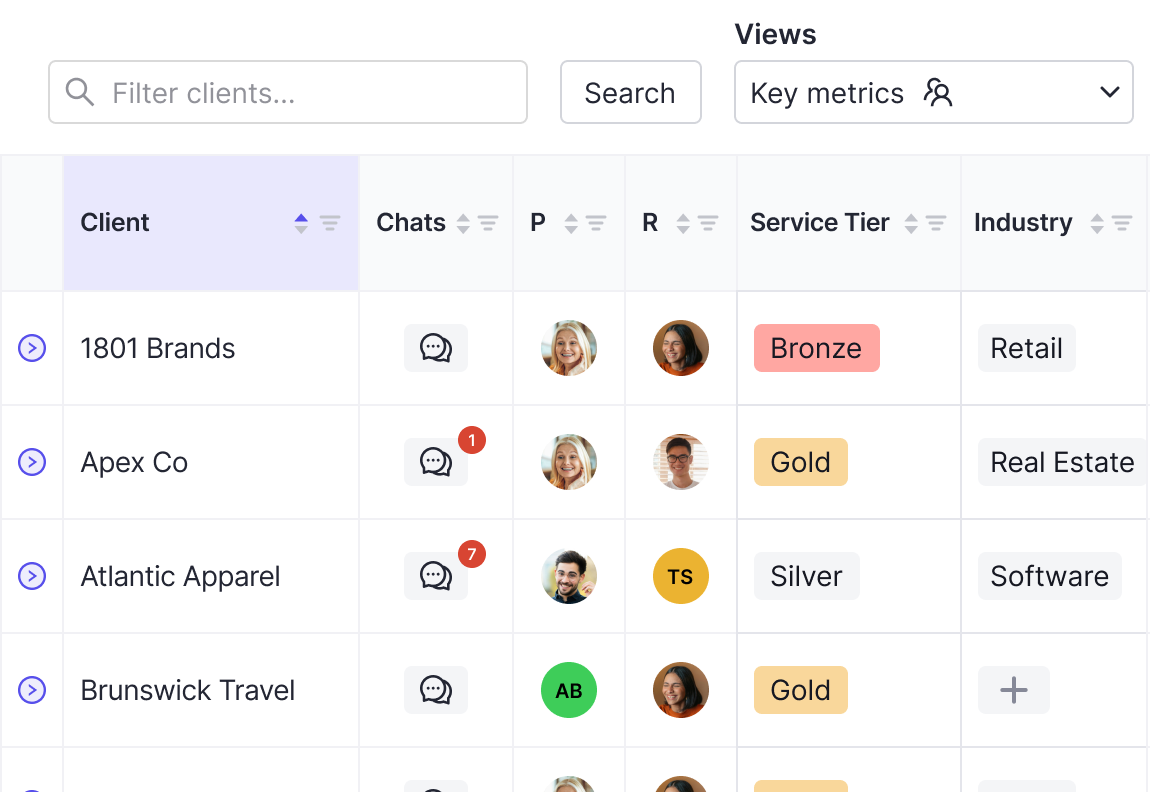
Client onboarding is the first real interaction a business owner has with your accounting firm. Get it right, and you set the tone for client satisfaction while maximizing bookkeeper efficiency for a win-win.
The best way to ensure smooth accounting client onboarding is to use a standardized onboarding checklist that covers all the bases, allowing you to convert a prospective client into one who sticks with you long-term.
With that said, here’s a detailed bookkeeping checklist for new clients with 10 key tasks.
The best way to ensure smooth accounting client onboarding is to use a standardized onboarding checklist that covers all the bases, allowing you to convert a prospective client into one who sticks with you long-term.
With that said, here’s a detailed bookkeeping checklist for new clients with 10 key tasks.
10 Essential New Client Onboarding Checklist Tasks
1. Get a Signed Contract and Client Payment
Before getting anything else underway, the first step in the client onboarding process is always to finalize your contract.
Here, you should clearly outline bookkeeper services, terms, fees, client information security protocol, and anything else a new client needs to know about when engaging your bookkeeping service.
This should ensure no curveballs could disrupt your relationship later on. Also, the client will have a point of reference if they need clarification about your arrangement.
After they’ve reviewed it, agreed, and signed the contract, you’ll need to collect the payment. Make sure you’re 100% transparent in this process so there are no hidden surprises that could create friction in the client experience.
Here, you should clearly outline bookkeeper services, terms, fees, client information security protocol, and anything else a new client needs to know about when engaging your bookkeeping service.
This should ensure no curveballs could disrupt your relationship later on. Also, the client will have a point of reference if they need clarification about your arrangement.
After they’ve reviewed it, agreed, and signed the contract, you’ll need to collect the payment. Make sure you’re 100% transparent in this process so there are no hidden surprises that could create friction in the client experience.
2. Send a Welcome Email and Make Introductions
Start building rapport right off the bat and get a new client comfortable with your accounting firm with a welcome email. There are two key things to do in this accounting client onboarding checklist stage to meet client expectations.
One, introduce them to the different members of your accounting staff they’ll be communicating with. Be sure to include contact info for each accountant and maybe a social media profile so the accounting client can get a feel for their personality.
Also, outline the next steps they should expect in the client onboarding process, along with critical documents and helpful resources made available on a client portal so they can quickly get their bearings.
Note that Keeper can streamline this process with Zapier triggers. Once a new client is added to Keeper, a welcome email with relevant links and announcements is automatically sent out. This makes for a warm welcome and quickly gets a new client up to speed without reaching out manually.
One, introduce them to the different members of your accounting staff they’ll be communicating with. Be sure to include contact info for each accountant and maybe a social media profile so the accounting client can get a feel for their personality.
Also, outline the next steps they should expect in the client onboarding process, along with critical documents and helpful resources made available on a client portal so they can quickly get their bearings.
Note that Keeper can streamline this process with Zapier triggers. Once a new client is added to Keeper, a welcome email with relevant links and announcements is automatically sent out. This makes for a warm welcome and quickly gets a new client up to speed without reaching out manually.
3. Send a Client Onboarding Questionnaire
At this point in the accounting client onboarding checklist, you’ve given the small business owner the information they need to feel comfortable as a new client. But it’s equally important to gather critical information from them to build a strong client relationship.
A simple way to accomplish this is by sending a questionnaire asking about a client’s:
- Preferred method of communication (phone, email, messenger, video calls, etc.)
- Preferred hours of communication
- Best time to schedule meetings
- Accounting software
- Preferred invoice frequency
- Goals and expectations
- Questions or concerns
A simple way to accomplish this is by sending a questionnaire asking about a client’s:
- Preferred method of communication (phone, email, messenger, video calls, etc.)
- Preferred hours of communication
- Best time to schedule meetings
- Accounting software
- Preferred invoice frequency
- Goals and expectations
- Questions or concerns
4. Set Up a Client Kickoff Meeting
You’ve likely already had a certain level of interaction with a new client when you arrive at this point of the accounting client onboarding checklist. But a kickoff meeting gives you a chance to strengthen that connection and flesh out the details before you officially start working together.
After you’ve looked over the questionnaire, you can use the client’s answers to guide the direction of your kickoff meeting.
For example, you can agree upon a specific method of communication, discuss how you can meet their goals and expectations, and address any concerns.
After you’ve looked over the questionnaire, you can use the client’s answers to guide the direction of your kickoff meeting.
For example, you can agree upon a specific method of communication, discuss how you can meet their goals and expectations, and address any concerns.
5. Get Access to Their Bookkeeping Software
Another vital step in the bookkeeping client onboarding checklist is getting access to either their QuickBooks Online or Xero files.
This allows you to monitor their bank account and inventory records, look at invoice history, track transactions, and get an overview of their overall financial state.
The sooner you get access, the sooner you can familiarize yourself with the client’s current bookkeeping processes.
Because of the inherent security risks that come with an accountant handling sensitive client information, always follow best practices like only sharing information with authorized team members, using strong passwords, and leveraging multi-factor authentication.
This allows you to monitor their bank account and inventory records, look at invoice history, track transactions, and get an overview of their overall financial state.
The sooner you get access, the sooner you can familiarize yourself with the client’s current bookkeeping processes.
Because of the inherent security risks that come with an accountant handling sensitive client information, always follow best practices like only sharing information with authorized team members, using strong passwords, and leveraging multi-factor authentication.
6. Get Access to Other Relevant Client Software, Systems, and Records
In addition to bookkeeping software, you also need access to things like:
- Accounting software
- Payroll software
- Invoicing document software
- Financial records
- Invoice information
- Tax documents
Anything that’s essential to enabling your accounting firm to manage day-to-day bookkeeping tasks for a client is needed. Again, always be diligent about following security best practices with this leg of the bookkeeping client onboarding checklist.
- Accounting software
- Payroll software
- Invoicing document software
- Financial records
- Invoice information
- Tax documents
Anything that’s essential to enabling your accounting firm to manage day-to-day bookkeeping tasks for a client is needed. Again, always be diligent about following security best practices with this leg of the bookkeeping client onboarding checklist.
7. Add the Client to Your Bookkeeping Practice Management Tool
To provide quality accounting services for a new bookkeeping client, you need a streamlined system for maintaining client communication, notifying clients when they need to complete bookkeeping tasks, and tracking task progress.
Adding them to a bookkeeping practice management tool like Keeper allows you to offer a single client portal for virtually everything on your daily bookkeeping checklist. For instance, you can ask a client a question about transactions,…
Adding them to a bookkeeping practice management tool like Keeper allows you to offer a single client portal for virtually everything on your daily bookkeeping checklist. For instance, you can ask a client a question about transactions,…
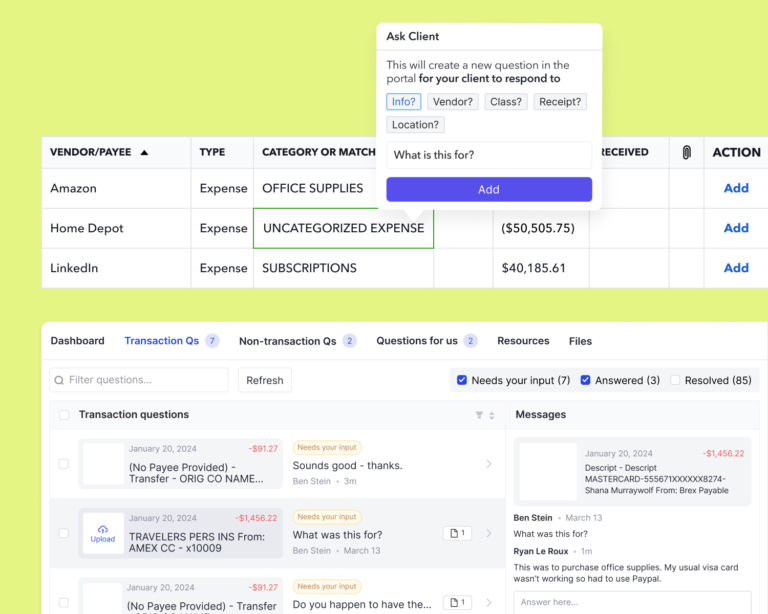
…automate file review,...
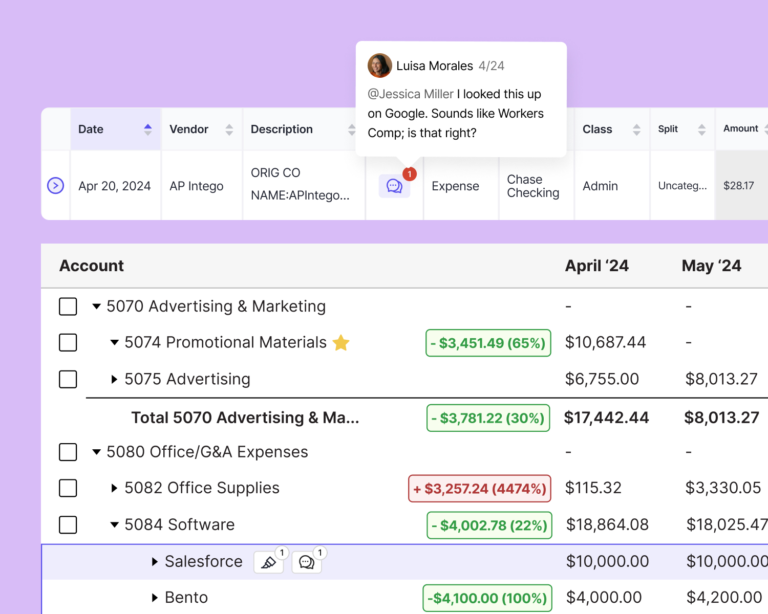
…and perform detailed task management to ensure nothing is missed.
8. Assign Team Members Tasks
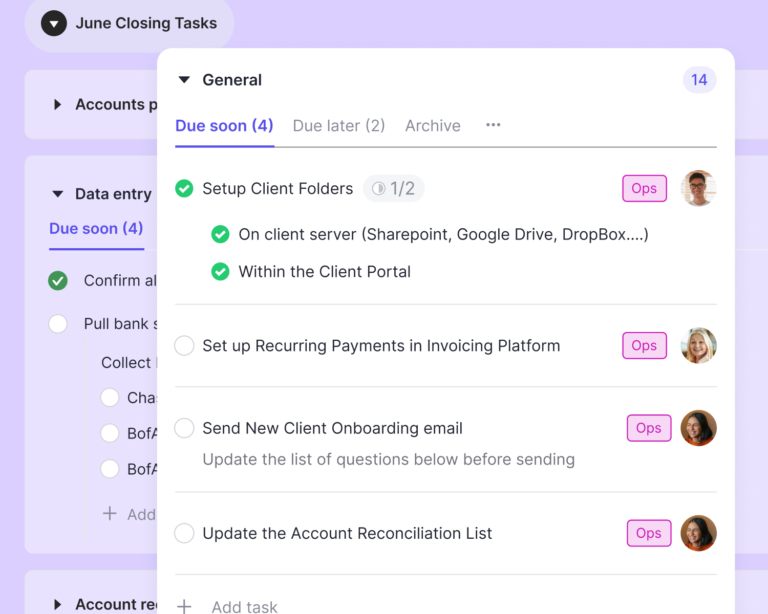
Besides having close communication with a client, it’s equally important to stay in the loop with your internal team. You need a system for efficiently assigning tasks while tracking them from start to finish.
Keeper is great for this as well. With it, you can assign tasks to individual team members.
Or you can quickly bulk assign tasks or assignees to all tasks in a specific section to save time when onboarding new clients.
Keeper is great for this as well. With it, you can assign tasks to individual team members.
Or you can quickly bulk assign tasks or assignees to all tasks in a specific section to save time when onboarding new clients.
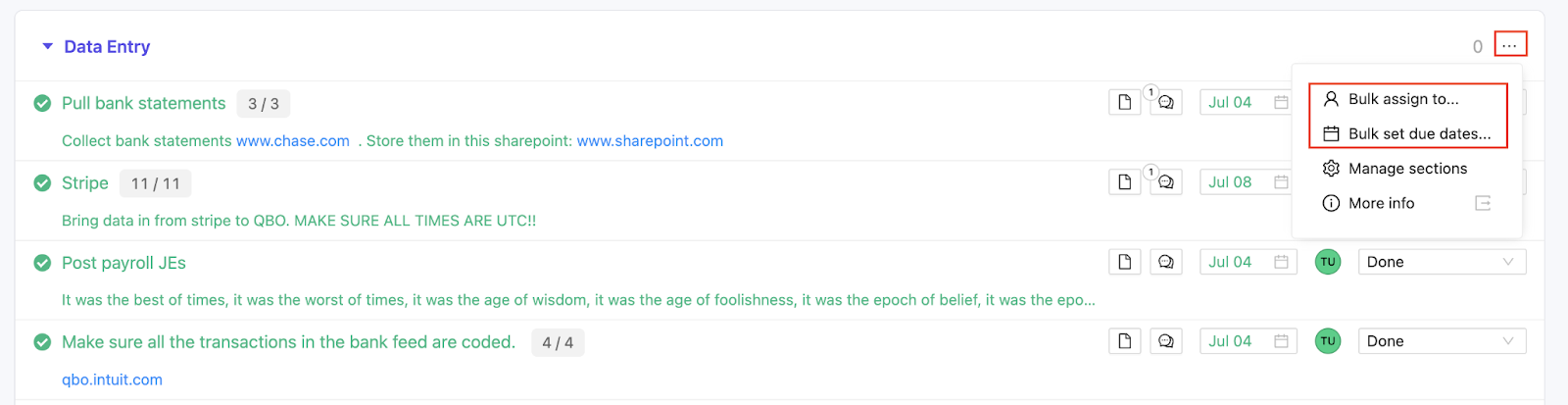
Keeper also gives you a bird’s-eye view of the status of each task to ensure deadlines are never missed.
9. Automate Client Reminders
A huge part of closing the books on time is ensuring a client promptly completes their tasks without needless back-and-forthing.
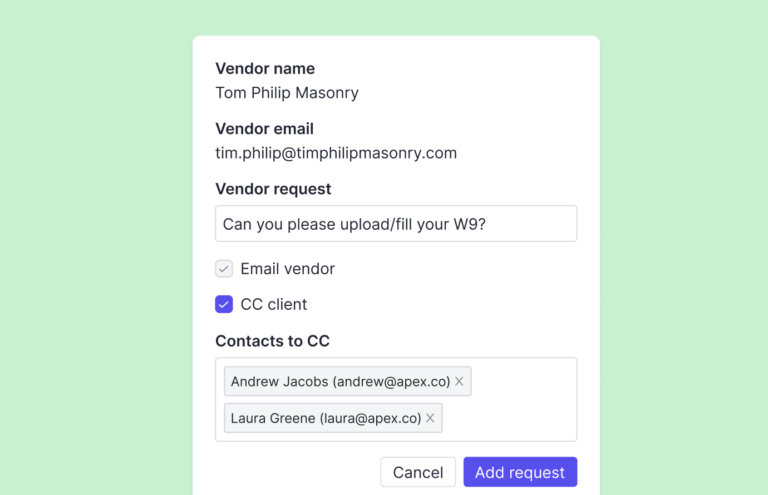
This can be achieved with a client onboarding workflow where automated client reminders get sent, providing you with the client information you need without constant manual reminders.
Say, for example, you need a client to fill out a 1099 form. Keeper bookkeeping workflow software automatically identifies which vendors meet the 1099 reporting threshold…
This can be achieved with a client onboarding workflow where automated client reminders get sent, providing you with the client information you need without constant manual reminders.
Say, for example, you need a client to fill out a 1099 form. Keeper bookkeeping workflow software automatically identifies which vendors meet the 1099 reporting threshold…
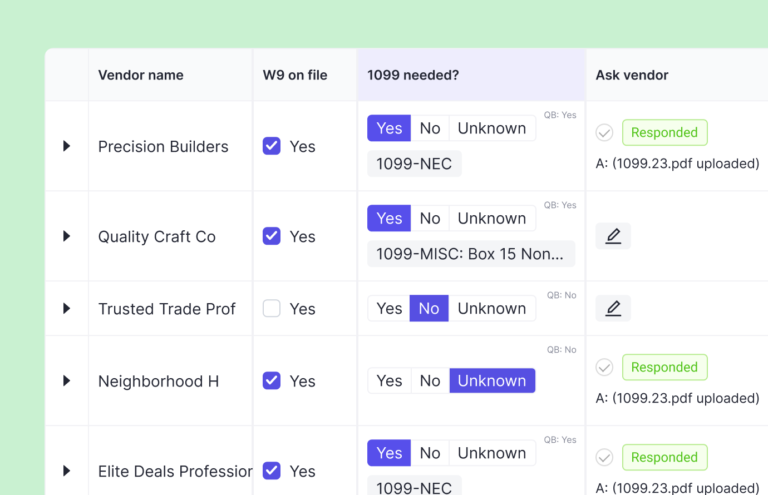
…and will automatically request your client (or the vendor themselves) to fill one out.
10. Schedule Ongoing Client Meetings
The final part of our bookkeeping client onboarding checklist deals with ongoing communication.
Consistent communication, especially in the initial stages of acquiring a new bookkeeping client, is a must for keeping things running smoothly and preventing issues that could delay closing the books.
Because each client’s needs are different, determine at the beginning of a new relationship the best frequency for communication, based on client feedback, and schedule upcoming meetings accordingly.
Once a month should be the bare minimum. But in some cases, you may want to hold meetings more frequently.
Consistent communication, especially in the initial stages of acquiring a new bookkeeping client, is a must for keeping things running smoothly and preventing issues that could delay closing the books.
Because each client’s needs are different, determine at the beginning of a new relationship the best frequency for communication, based on client feedback, and schedule upcoming meetings accordingly.
Once a month should be the bare minimum. But in some cases, you may want to hold meetings more frequently.
Use Keeper to Onboard New Clients
Like most areas of business, smooth, streamlined client onboarding requires bookkeepers to use the right tools.
When it comes to bookkeeping practice management software, Keeper checks all the boxes on an onboarding checklist and can help you get a new client up and running quickly and efficiently.
Keeper is the first bookkeeping platform that integrates with both QuickBooks Online and Xero accounting software and covers all bases.
And unlike similar options, like Content Snare, which caters to multiple industries, Keeper focuses solely on bookkeeping to turn more potential clients into satisfied, long-term clients.
Key features include:
- A single client portal for effortless communication
- Task management for organizing and tracking tasks from beginning to end
- Automatic client reminders
- Bookkeeping workflow automation
And because you only have to use one app with countless integrations, Keeper prevents you from having to jump between three or four programs at once to serve a client. Best of all, bookkeepers that use Keeper are often able to close the books in half the time.
Book a demo today to learn more.