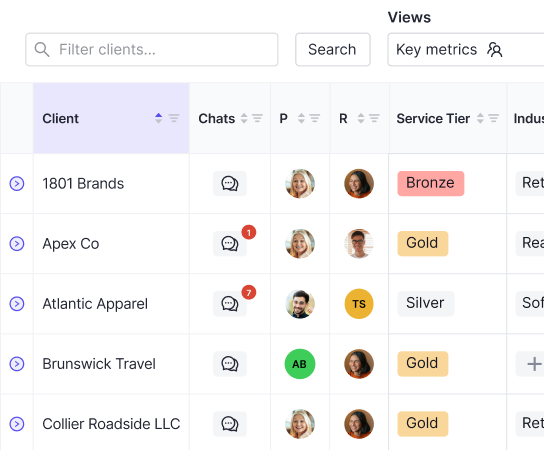


Most accounting software is built for one set of books. When you're managing close for dozens of clients, that single-entity design falls apart quickly. You end up toggling between client files, rebuilding the same checklist every month, and chasing the same people for the same documents. Financial close management software for accounting firms flips that structure: it gives you one view across all your clients, automates the repetitive coordination steps, and keeps communication tied to each close so nothing gets buried in your inbox.
TLDR:
- Accounting firms managing dozens of client closes need software built for multi-client workflows, not single-entity tools like QuickBooks or corporate finance platforms like FloQast that were designed for internal teams.
- Choose tools that execute the close work (reconciliations, journal entries, ledger sync) instead of just tracking tasks, saving 30-50% of close time per client.
- Per-client pricing scales with your book of business without penalizing headcount growth, while per-user models add cost every time you hire.
- Double runs AI bank feeds, automated reconciliations, accrual management, and two-way QuickBooks Online and Xero sync in one workspace, with client communication built in so nothing gets lost in email.
- Most alternatives (Numeric, FloQast, Karbon) were built for single-entity corporate teams or practice management without close execution, forcing firms to toggle between systems and manually bridge the gaps.
What is Financial Close Management Software for Accounting Firms?
Financial close management software for accounting firms is a specialized category built to help practices execute and oversee the month-end close process across an entire client portfolio. These tools handle the coordination layer around the ledger: task management, workflow automation, client communication, and progress tracking across multiple clients running in parallel.
General accounting software like QuickBooks or Xero is designed around a single entity's books. Close management software is designed for the firm side, giving practitioners visibility into every client's close status at once, so nothing slips through the cracks when you're juggling ten, twenty, or fifty clients simultaneously.

What these tools actually do
The core capabilities fall into a few buckets:
- Task and checklist management tied to the close calendar, so recurring steps get assigned, tracked, and completed without someone manually rebuilding the list each month.
- Client-facing workflows that collect documents, approvals, and responses without endless back-and-forth over email.
- Multi-client dashboards that give the firm a single view across all active engagements, surfacing which closes are on track and which need attention.
- Integration with the underlying ledger (typically QuickBooks Online or Xero) so the workflow layer stays in sync with actual book data.
The distinction between tracking and executing matters here. Some tools show you the status of a close. Others actively do the work by running reconciliations, drafting entries, and pushing data between systems so your team spends less time on manual steps and more time on judgment-based review.
How We Ranked Financial Close Management Software for Accounting Firms
Ranking financial close management software for accounting firms requires a different lens than assessing tools built for corporate finance teams. The criteria below reflect what actually matters in a multi-client firm context.

- Accounting firm fit: The tool should be built around managing multiple client closes simultaneously, with clear client-level visibility, instead of a single-entity workflow repackaged for firms.
- Automation depth: Look for software that handles reconciliations, journal entries, and task assignments automatically instead of just surfacing a checklist for humans to work through manually.
- Integration quality: For most accounting firms, that means two-way syncing with QuickBooks Online and Xero. Broken or one-directional syncs create data gaps that surface at the worst possible moment.
- Pricing structure: Per-client pricing scales predictably as a firm grows. Per-user or enterprise licensing structures penalize firms for adding clients or staff.
- Collaboration and client communication: Firms spend considerable time chasing clients for documents and approvals. Software that centralizes that communication reduces the back-and-forth without adding another inbox to manage.
- Setup and onboarding time: A tool that takes months to configure before it delivers value creates real cost. Faster time-to-value matters more for firms with lean teams.
- AI capabilities: AI that flags anomalies, drafts entries, or surfaces missing data saves hours per close. The question is whether that AI works across all clients or only at the entity level.
Best Overall Financial Close Management Software for Accounting Firms: Double
Double executes the entire close workflow inside one workspace, connected directly to QuickBooks Online and Xero. Bank feeds, reconciliations, journal entries, accruals, and client communication all happen without switching applications or re-entering data elsewhere.
Core strengths
- AI bank feeds with composable rules that go well beyond what QuickBooks Online's native categorization supports, including bulk approval by vendor group
- AI Composer for converting payroll reports, payment exports, and complex source documents into balanced journal entries automatically with accruals management
- A built-in client portal that keeps document requests, approvals, and conversations tied directly to the relevant transaction or reconciliation item
- Per-client pricing with no user fees, which scales cleanly as a firm adds new clients without the cost structure penalizing firm growth
- Two-way sync with QuickBooks Online and Xero, so the ledger stays current without manual exports or reconciliation between systems
Numeric
Numeric is a close management tool for in-house teams, with a particular focus on mid-market companies. It offers automated reconciliations, flux analysis, and a checklist-driven close workflow that gives controllers visibility into where the month-end process stands at any given moment.
For accounting firms managing multiple clients, the fit gets complicated. Numeric's architecture is built around a single entity, so firms running parallel closes across dozens of clients will find the multi-client workflow requires heavy manual coordination. There's no native client-switching experience designed for how firms actually work.
What Numeric Does Well
- Flux analysis is a genuine strength, automatically surfacing variance explanations so accountants spend less time chasing numbers and more time reviewing them.
- The reconciliation workspace is clean and well-designed, making it easy for in-house teams to track status across accounts without digging through spreadsheets.
- Slack and email integrations keep close communication tied to the workflow without scattering it across inboxes.
Where It Falls Short for Firms
Numeric's pricing is structured around internal finance teams, not the per-client model that makes sense for accounting firms serving multiple businesses. Firms looking to scale across a client roster will find that the cost structure and the product architecture both point toward a different buyer profile.
If your firm manages a high volume of clients and needs a purpose-built close workflow, Numeric is worth understanding as a benchmark for reconciliation UX, but it was not designed with your use case in mind.
FloQast
FloQast is a recognized name in financial close management, and for good reason. It was purpose-built for accountants, which shows in how it organizes the close process around familiar workflows like reconciliations, flux analysis, and audit trails.
The tool connects directly to your general ledger and flags reconciliation mismatches automatically, which cuts down on the manual back-and-forth that slows most month-end closes. Teams get a centralized checklist view, status visibility across preparers and reviewers, and automated sign-off workflows.
A few things worth knowing before committing:
- Pricing is user-based and typically involves multi-year commitments, which can make it a heavier investment for smaller accounting firms.
- It skews toward corporate accounting teams and larger organizations, so firms managing many smaller clients may find the structure less intuitive for their workflows.
- Implementation timelines tend to run longer compared to lighter-weight tools, with more configuration required upfront.
FloQast does close management well at scale. The limitation worth noting is that it was designed with internal finance teams in mind, so accounting firms juggling dozens of client books may run into friction around multi-entity management and per-client reporting.
Canopy
Canopy is practice management software built around tax workflows, covering client management, document handling, billing, and workflow automation. According to CPA Practice Advisor, a new bookkeeping intelligence module is planned for general availability in summer 2026.
What Canopy Offers
- Client and document management, time and billing, payments, and practice insights
- Tax resolution workflows with direct IRS Transcript Delivery System integration
- A client portal for secure document exchange and client communication
Tax-first firms handling complex resolution cases will find the IRS transcript access genuinely useful. For bookkeeping-focused practices, the fit is narrower. QuickBooks and Xero integration stays at a high level without transaction-level close execution, and core close features including AI bank feeds, accrual management, and reconciliation automation are listed as pending or in development, meaning close work still runs through separate tools.
Xenett
Xenett is an AI-powered close management tool built expressly for accounting firms. It focuses on automating reconciliations, flagging anomalies, and keeping the month-end checklist moving without constant manual follow-up from the team.
What Xenett Does Well
- The anomaly detection catches unusual transactions before they become review headaches, surfacing issues before the books get signed off.
- Checklist automation keeps recurring close tasks assigned and on schedule, reducing the back-and-forth that slows firms down when managing multiple clients.
- The client collaboration features let firms collect documents and approvals directly inside the workflow, so fewer things fall through the cracks waiting on email responses.
Where It Falls Short
The limitation worth noting is that Xenett works best as a review and checklist layer. Firms looking for deep two-way sync with QuickBooks Online or Xero as a core part of their close process may find the integrations less tightly connected than they need. It also carries a per-user pricing structure, which adds up quickly as firm headcount grows.
Pricing
Xenett offers tiered plans based on team size. Specific pricing is available on their website, and a free trial is offered for new accounts.
Feature | Xenett |
|---|---|
AI anomaly detection | Yes |
Checklist automation | Yes |
Client collaboration | Yes |
QuickBooks Online sync | Limited |
Per-user pricing | Yes |
Karbon
Karbon is practice management software built for accounting firms that want visibility across their entire client portfolio. It organizes work, client communications, and team collaboration in one place, which makes it a natural fit for firms that want to reduce inbox chaos and keep jobs moving.
That said, Karbon is built around workflow and practice management, not financial close execution. It tracks tasks and deadlines well, but it does not automate reconciliation steps, flag variances, or execute close procedures the way dedicated financial close management software does.
Where Karbon Falls Short for Close Management
For firms running multi-client month-end closes, Karbon covers the coordination layer but leaves the actual close work to other tools. Teams often end up toggling between Karbon for task tracking and separate spreadsheets or accounting software to do the reconciliation itself. That handoff between systems is where close timelines slip and errors go unnoticed.
Firms with a large volume of recurring close clients may find Karbon's per-user pricing adds up quickly relative to tools priced around client count.
- The work management features are genuinely strong for onboarding, client requests, and internal job tracking across service lines.
- Client-facing workflows like proposals and engagements are well-designed and widely used by mid-size firms.
- The limitation worth noting is that close-specific automation, like auto-reconciliation or AI-assisted variance detection, falls outside what Karbon was built to do.
Karbon works well as a firm's coordination backbone, but accounting teams running high-frequency closes typically need to pair it with a dedicated close tool to cover the gap.
Feature Comparison Table of Financial Close Management Software for Accounting Firms
Here is how the tools covered in this guide stack up across the features that matter most for accounting firms running multi-client closes.
Feature | Double | Numeric | FloQast | Canopy | Xenett | Karbon |
|---|---|---|---|---|---|---|
AI Bank Feeds | Yes | No | No | No | No | No |
AI Journal Entries | Yes | Yes | No | No | No | No |
Accruals Management | Yes | No | Yes | No | Yes | No |
AI Reconciliation Analysis | Yes | Yes | No | No | Yes | No |
Client Portal | Yes | No | No | Yes | Yes | Yes |
Interactive Financial Reporting | Yes | No | No | No | No | No |
Per-Client Pricing | Yes | No | No | No | Yes | No |
QuickBooks Online Integration | Yes | Yes | Yes | Yes | Yes | Yes |
Xero Integration | Yes | Yes | Yes | Yes | Yes | Yes |
Sage Intacct Integration | Yes | Yes | Yes | No | No | No |
Practice-Wide AI Assistant | Yes | No | No | No | No | Yes |
A few things stand out here. Double is the only tool with AI bank feeds and interactive financial reporting, and the only one pairing per-client pricing with a full AI-driven close workflow. Karbon offers a practice-wide AI assistant but without the close-specific accounting features. Financial Cents and TaxDome cover practice management and client workflows well, but neither executes close work — no bank feed categorization, no journal entries, no accruals — leaving firms to handle the actual accounting in separate systems.
Why Double is the Best Financial Close Management Software for Accounting Firms
Double covers the full close process, from bank feed through published report, inside one workspace that writes back to QuickBooks Online or Xero in real time. Nothing gets re-entered. Nothing needs to be matched up between systems after the fact.
The shift from manual processes to automated close management software represents a fundamental change in how accounting firms operate. When reconciliations run automatically and journal entries draft themselves, accountants spend their time on analysis and client advisory work instead of repetitive data tasks.
That architecture is where the documented 30-50% time savings per close come from. TeKoda scaled from 15 to 100+ clients after replacing manual processes with structured workflows. Perlson LLP grew their Virtual Controller Division from $15K to $1M net revenue over two and a half years.
Pricing is per connected client with no user fees, so the cost scales with your book of business instead of your headcount.
What Sets Double Apart
Here is what accounting firms consistently point to after switching:
- AI handles the repetitive data work automatically, categorizing transactions and flagging anomalies so accountants spend time on review and judgment instead of data entry.
- Every close runs inside a structured workflow with task ownership, due dates, and real-time status visibility, so nothing falls through the gaps between team members.
- Client communication, document requests, and approvals all happen inside the same workspace, cutting the back-and-forth that typically lives across email threads.
- The two-way sync with QuickBooks Online and Xero means the books stay current throughout the close, all the way through.
Final Thoughts on Close Management Tools for Multi-Client Firms
You need software that matches how accounting firms actually operate: lots of clients, recurring monthly work, and a pricing structure that doesn't punish you for growing your practice. Tools built for internal finance teams will fight you on multi-entity workflows and per-user costs that scale with headcount instead of revenue. The firms pulling thirty to fifty percent time savings per close are using AI that categorizes transactions, drafts entries, and matches up accounts without manual intervention at each step. Double handles that execution layer while syncing directly to QuickBooks Online and Xero, so nothing gets re-entered and your books stay current throughout the month. See how it works for your firm.