
When you're running month-end close for five or ten clients at once, the bottleneck isn't knowing what needs to happen. It's the hours spent matching transactions, drafting journal entries, and closing accounts before you can review anything. Most teams take 8 to 10 days to close each period, with manual data entry consuming the majority of that time. AI bookkeeping software should handle that prep layer so your team starts from conclusions instead of raw data. The tools that do this well post changes directly to the ledger. The ones that don't leave you copying outputs from a spreadsheet back into QuickBooks Online or Xero manually.
TLDR:
- AI bookkeeping software automates transaction categorization, reconciliation, and journal entries, compressing close cycles from days to hours.
- Execution depth determines ranking: tools posting directly to the ledger beat those producing spreadsheets for manual transfer.
- Most tools handle single tasks or single-entity workflows; multi-client architecture remains rare across the category.
- Double automates reconciliations, journal entries, and flux analysis with two-way QuickBooks Online and Xero sync, with firms reporting 30 to 50 percent time savings per engagement.
What Is AI Bookkeeping Software?
AI bookkeeping software uses AI to automate the repetitive tasks that consume most of an accountant's close cycle: transaction categorization, bank reconciliation, receipt processing, and journal entry creation. The automated bookkeeping segment is projected to grow at 47.8% annually through the end of the decade, driven by firms seeking to compress close cycles. Practitioners spend less time manually sorting data and more time reviewing outcomes.

The practical result is a shorter close. Tasks that once took days compress into hours. For accounting firms managing dozens of clients, that recovered time creates capacity to take on more work without adding headcount. For internal finance teams, it frees senior accountants from data-heavy prep work so they can spend more time on variance analysis, forecasting, and advisory conversations.
How This AI Bookkeeping Software Was Ranked
Five criteria shaped the rankings in this guide.

The most important was execution depth: whether AI posts transactions directly to the ledger or produces a spreadsheet requiring manual transfer. Tools that write to QuickBooks Online, Xero, Sage Intacct, or NetSuite without an intermediate file export scored highest. AI that accelerates spreadsheet production is still leaving a manual step in the loop.
Beyond that, each tool was assessed on:
- AI automation coverage across bank feeds, journal entries, and reconciliations, and how much of that work runs without prompting
- Integration quality, including whether sync is two-way, real-time, and native instead of routed through a third-party connector
- Workflow completeness, meaning whether task tracking and close execution live in the same place or require jumping between separate tools
- Pricing structure and how costs scale as your team grows or your client count increases
- Implementation complexity and whether getting the tool live requires IT resources or can be handled by the finance team directly
Best Overall AI Bookkeeping Software: Double
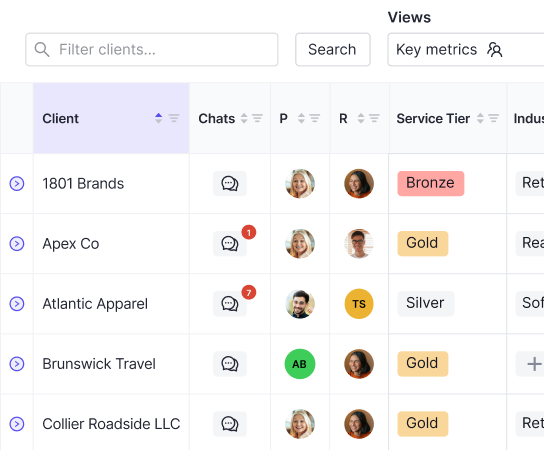
Double is purpose-built for accounting firms that run multi-client closes at scale. Where most AI bookkeeping software automates a single task or surfaces a dashboard, Double executes the close itself, handling reconciliations, journal entries, flux analysis, and client communication inside one connected workflow.
The integrations are two-way with QuickBooks Online and Xero, so transaction data flows in both directions without manual exports or copy-paste handoffs. Every change made inside Double syncs back to the ledger.
What Double Automates
The AI in Double handles the work that typically consumes the most unbillable hours each month:
- Reconciliation matching across all connected client accounts, with exceptions flagged for review instead of buried in a spreadsheet
- Journal entry preparation, including accruals, prepaids, and recurring entries, drafted and ready for approval
- Flux analysis that writes variance explanations at the vendor and transaction level, so reviewers start from a drafted narrative instead of a blank page
- Client-facing deliverables packaged and sent directly from the close workflow, removing the formatting and export steps that trail most closes
Pricing
Accounting firms pay per connected client, with no user fees or seat charges added on top. Firms using Double report saving 30 to 50 percent of close time per engagement, which compounds quickly across a multi-client book.
Basis
Basis is one of the more focused AI bookkeeping tools in this space, built for accounting firms instead of in-house finance teams. It handles automated transaction categorization, bank reconciliation, and month-end close preparation across client books, with AI that learns from your corrections over time.
Where Basis stands out is its client-facing workflow. Firms can send automated document requests, collect receipts and supporting materials through a client portal, and track outstanding items without chasing emails manually. The AI flags anomalies and categorizes transactions, leaving the accountant to review instead of input.
Basis connects with QuickBooks Online and Xero, covering the two ledgers most accounting firms run day-to-day.
What to Keep in Mind
Basis works well for firms whose primary bottleneck is transaction-level bookkeeping across a client roster. If your workflow extends into deeper close management, flux analysis, or multi-entity reporting, the tool's scope starts to feel narrow. It was designed to handle the data layer of bookkeeping, and that focus shows in both what it does well and where it stops.
Pricing is usage-based and scales with the number of connected clients, which suits growing firms but can add up quickly as your roster expands.
Dext
Dext sits in a specific lane: document capture and receipt management. It connects to accounting software like QuickBooks Online and Xero, automatically extracting data from receipts, invoices, and bank statements so bookkeepers spend less time on manual data entry.
Where Dext Works Well
For firms drowning in client receipt backlogs, Dext solves a real problem. Clients can snap photos of receipts through a mobile app, and Dext pulls the line-item data, matches it to a supplier, and pushes the transaction to the general ledger. The friction of chasing paper disappears.
Where It Falls Short as AI Bookkeeping Software
The limitation worth noting is structural. Dext was built for document ingestion, not bookkeeping execution. Once the receipt data lands in your accounting software, Dext's job is done. Categorization rules exist, but they require manual setup and ongoing maintenance. There is no AI that learns your client's chart of accounts over time, flags anomalies, or prepares month-end workpapers. It captures data well. It does not do bookkeeping.
For firms that want AI bookkeeping software in the fuller sense, Dext functions as one input layer instead of a complete solution. Teams typically pair it with a separate close management or bookkeeping tool to cover everything downstream of document capture.
Numeric
Numeric was built for corporate finance teams managing a single entity close. It does reconciliation tracking, flux analysis, and variance commentary well, and it has earned real adoption among in-house controllers who want a clean, purpose-built close tool.
The structural limitation worth noting is that its architecture assumes one entity. Accounting firms managing multi-client portfolios hit friction quickly because there is no client-switching layer, no per-client pricing, and no firm-level visibility across engagements. Numeric works well in the environment it was designed for. For multi-client firm workflows, the fit is not there.
FloQast
FloQast has earned a wide user base among accounting teams, with a particularly strong foothold in corporate finance departments that want structured close checklists and reconciliation tracking.
The tool covers task assignment, sign-off workflows, flux analysis, and reconciliation matching. Teams managing a single-entity close with defined ownership across a finance department tend to get real value from it.
The limitation worth noting is structural. FloQast was designed for internal finance teams, so accounting firms running multi-client portfolios hit friction fast. There is no multi-client architecture, and pricing is user-based with multi-year commitments, which makes the cost structure a poor fit for firms managing dozens of clients simultaneously.
Xenett
Xenett is an AI bookkeeping software built for accounting firms, with a focus on catching errors before they reach the client. Its core feature is an automated review engine that scans for common bookkeeping mistakes across connected QuickBooks Online and Xero files.
What Xenett Does Well
Where Xenett earns its place is in the review workflow. Instead of waiting for a human to comb through a client file manually, Xenett runs checks in the background and surfaces issues like uncategorized transactions, duplicate entries, and misclassified expenses automatically.
A few things it handles:
- Automated error detection across client files, flagging issues by category so reviewers know exactly where to look first
- A client collaboration layer that lets firms send queries to clients and track responses without back-and-forth emails
- Checklist-based close workflows that assign tasks to team members with status tracking
Where It Falls Short
The limitation worth noting is scope. Xenett is a review and error-detection tool, which means it identifies problems but stops short of resolving them inside the workflow. Journal entries, reconciliation matching, and posting still happen elsewhere. For firms that want AI to handle the actual execution of bookkeeping work instead of flagging it for human correction, Xenett covers only part of that loop.
Pricing is per client, which scales predictably, but the feature set is narrower than some alternatives on this list that bundle error detection with close automation in a single workspace.
Feature Comparison Table of AI Bookkeeping Software
No single tool checks every box, so a side-by-side view helps clarify where each option starts to thin out.
Feature | Double | Basis | Dext | Numeric | FloQast | Xenett |
|---|---|---|---|---|---|---|
AI Bank Feed Automation | Yes | No | No | No | No | No |
AI Journal Entry Creation | Yes | Yes | No | Yes | No | No |
AI Reconciliation | Yes | No | No | Yes | No | No |
Automated Accruals | Yes | No | No | No | Yes | No |
Client Portal | Yes | No | No | No | No | Yes |
Ledger-Direct Posting | Yes | No | No | No | No | No |
QuickBooks Online Integration | Yes | Yes | Yes | Yes | Yes | Yes |
Sage Intacct Integration | Yes | Yes | Yes | Yes | Yes | No |
NetSuite Integration | Yes | Yes | Yes | Yes | Yes | No |
Per-Client Pricing | Yes | No | No | No | No | Yes |
Transparent Pricing | Yes | No | No | No | No | No |
Ledger-direct posting is the sharpest dividing line in this list. Every tool here does something useful, but only Double writes AI output directly to the ledger without routing it through a spreadsheet first.
Why Double Is the Best AI Bookkeeping Software
Double is purpose-built for accounting firms that run month-end close across multiple clients simultaneously. Where most AI bookkeeping software tools handle individual transactions or assist a single-entity workflow, Double automates the entire close cycle across your full client portfolio.
The core workflow connects directly to QuickBooks Online and Xero via two-way sync, pulling live transaction data into a close checklist where AI handles the repetitive categorization, flags anomalies, and drafts variance explanations automatically. Firms using Double report saving 30 to 50 percent of close time per engagement.
What Double Does in the Close
A few capabilities set Double apart from the other tools in this list:
- AI flux analysis automatically drafts variance explanations at the vendor and transaction level across your P&L and Balance Sheet, with configurable materiality thresholds. Reviewers start from conclusions, not raw data.
- Two-way sync with QuickBooks Online and Xero means changes made inside Double post back to the general ledger without a manual export step.
- The close checklist assigns each task to an owner with a due date, so nothing falls through between preparer and reviewer.
- Anomaly detection runs against every transaction, surfacing categorization errors and duplicate entries before the file reaches a partner.
- Pricing is per connected client with no user fees or seat limits, so adding staff to a client engagement never triggers an additional charge.
For accounting firms managing five or more concurrent client closes, the multi-client architecture is the structural advantage no single-entity tool can replicate.
Final Thoughts on AI Bookkeeping Software for Accounting Firms
You can automate transaction categorization with half a dozen tools on this list. You can automate reconciliation matching with three of them. Only one writes the output directly to QuickBooks Online or Xero without an export step in between. If you're managing five or more client closes each month, book a demo and watch Double handle bank feeds, journal entries, and flux analysis inside a single workflow that syncs back to the ledger in real time.