
Historically, bookkeeping has been a profession filled with repetitive, manual tasks, such as data entry, payroll processing, and document management. The issue with these tasks is that they can quickly eat through your work week and reduce how much you can get done on other client projects.
But with bookkeeping accounting workflow automation, you can drastically increase your productivity to close the books quicker, while optimizing the client experience.
TLDR:
- A Dext survey found 56% of accountants spend too much time on manual tasks, with automation projected to cover 51-75% of work within 10 years.
- Automate bank reconciliation, transaction categorization, W-9 tracking, client reminders, and receipt management to recover hours for higher-value work.
- Keep complex transactions, detailed financial analysis, regulatory advice, and sensitive client conversations as manual processes requiring your judgment.
- AI receipt management pulls data from uploaded receipts, applies coding rules, and posts transactions directly to the ledger with an automatic audit trail.
- Double covers W-9 requests, miscoded transaction flagging, custom KPI reporting, and team task management in one workspace synced to QuickBooks Online and Xero.
What Should You Automate? (And What Should You Not?)
Research has found that most accountants waste much of their time on manual tasks. For perspective, a Dext survey of 250 bookkeepers and accountants found that "56% spend too much time on manual tasks."
Further, “The survey revealed that, on average, 26-50% of tasks are currently automated. However, when looking to the future, respondents feel this will grow, with 51-75% of tasks predicted to be automated in 10 years.”
These numbers show that bookkeeping workflow automation is fairly well used today and can help simplify the accounting process. However, there’s plenty of room for improvement, and widespread implementation should gradually happen over time.
Getting on board with accounting workflow management automation now should give you an edge over many competitors and make you an in-demand accountant that many business owners seek.
The question is, what accounting workflow tasks should you automate, and which should you not?
Accounting Tasks Worth Automating
This will vary depending on who you ask, but most bookkeepers can benefit from automating the following accounting tasks:
- 1099 management
- Notifying clients when they need to complete an action
- Accounting team task management
- Data entry
- Accounting journal entry
- Payroll processing
- Invoice processing
- Expense tracking
- Cash flow tracking
- Bank reconciliation
- Financial reporting
Tasks to Keep as Manual Processes
As for tasks that shouldn’t be automated, here are some that immediately come to mind:
- Complex transactions
- Detailed financial analysis
- Giving a client regulatory advice
- In-depth client interactions (on complex topics that demand one-on-one communication)
Automate These Tasks | Keep These Tasks Manual |
|---|---|
1099 management | Complex or unusual transactions |
Client action notifications | Detailed financial analysis |
Accounting team task management | Regulatory advice to clients |
Data entry | In-depth client conversations on complex topics |
Journal entry processing | |
Payroll processing | |
Invoice processing | |
Expense tracking | |
Cash flow tracking | |
Financial reporting |
The key to designing a successful accounting workflow is identifying where automation should be used and what should be left as a manual process. With that said, here are six automated workflows you can use to handle tasks without compromising the client experience.
1. W-9 Requests and Tracking
If we’re being completely candid, it’s fair to say that requesting W-9s and tracking 1099-eligible vendors is one of the most unpleasant parts of accounting.
You have to identify who meets the threshold to receive a 1099. Then you have to send a W-9 form and wait for it to be filled out.
If the client is busy, doesn’t want to contact their past vendors, or overlooks it entirely, this could take a while.
And if there are any issues and you need to request revisions, this can lead to additional back-and-forthing before the process is finalized. Then, you have to update the client info in QuickBooks Online, Xero, or whatever accounting software you use.
It’s a major pain and a part of accounting that can be a serious time drainer.
Fortunately, 1099 and W-9 requesting and tracking can be largely automated with bookkeeping practice management software like Double. With Double, you can easily identify who meets the threshold without doing it manually.
You can conveniently make requests through the Client Portal and keep track of reminders until you get the client information you need. And when the client information is updated, Double will automatically sync it with QuickBooks Online or Xero, with no additional lifting on your end. If you’ve ever felt the frustration of gathering W-9s, this is one of the main automated processes you’ll be interested in.
2. Client Reminders and Notifications
Needless to say, close client communication is a critical part of effective accounting. As a bookkeeper, you must keep clients in the loop and get important information when running your accounting practice.
But at the same time, constantly sending manual client reminders and notifications can eat away at your productivity, making it harder to close the books on time.
That’s why basic client interactions should definitely be part of your automated accounting workflow.
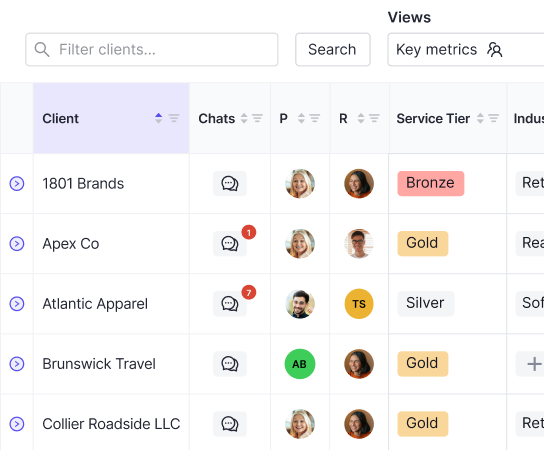
For example, with bookkeeping workflow software, you can conveniently organize and store all of your clients in a single dashboard.
When you need to send a reminder or follow-up, you can create scheduled requests or automated messages, letting a client know about outstanding questions that demand their response.
On the client’s end, they have a single accounting platform to answer questions and view documents. As a result, they don’t have to bounce around from platform to platform or wonder where to reply to your messages, making their life easier.
That way, you don’t have to spend an exorbitant amount of time on client communication, which helps you to focus on the nuts and bolts of accounting operations. At the same time, this creates a smoother experience for the client as well, for a win-win.
3. Bookkeeping Transaction Categorization
Before you can perform financial analysis, identify spending patterns, or make data-driven decisions, you first need to know where funds are coming from and where they are being spent. The problem is that manual transaction categorization can be incredibly time-consuming, with a high probability of errors.
But this is yet another area that can be dramatically simplified with a workflow accounting process.
Take, for instance, expense inconsistencies. Double's accounting automation management software will automatically flag transactions that may have been miscoded by comparing expenses against historical client data.
That way, you can quickly pinpoint potential issues and resolve them without manually having to sift through mountains of data. Once a correction is made, it’s automatically synced to your accounting software, saving even more time.
And with uncategorized transactions, you can easily view them in a single location.
Instead of combing through piles of information, you can quickly fix uncategorized transactions, with all client responses and documentation being automatically saved for quick reference later on.
If someone in your accounting team needs to see what happened during an audit trail, they can quickly find it. Or if a client wants to see the details, they can easily locate it as well.
4. Client Financial Reports
Whether it’s budgeting, investing, or strategic planning, helping a client get ahead requires data-driven decision-making. Gaining those necessary insights requires complete, accurate financial reports with detailed accounting data.
Historically, generating financial reports has been a labor-intensive process. But that’s no longer the case with the right bookkeeping practice management platform.
A core feature of Double, for example, is custom management reporting that provides a complete overview of everything you need to help a client operate at their peak potential.
From cash on hand to sales to total expenses to spend by category and beyond, Double can provide a clear picture of a client’s financial state.
But it goes much deeper than that.
Double even lets you track custom KPIs that are the most integral to an individual client and create variables using formulas from directly within the platform.
Whenever client data on QuickBooks Online or Xero is updated, these metrics are simultaneously updated as well.
In turn, you can generate critical insights without a ton of heavy lifting, and share your findings with clients through user-friendly graphs and charts that are easy to digest. As a result, a client doesn’t have to be a data scientist to unpack your findings.
At a glance, they can understand what’s happening and readily apply the data to improve their finances moving forward.
You can even publish a financial report right from the client portal to save even more time.
5. Employee Task Management
Equally as important as client communication is team communication. Whatever project you’re working on and the specific task, you need to keep everyone in the loop and prevent critical information from being siloed.
And if you can do that efficiently without falling down the back-and-forthing trap, that’s even better.
Double, a bookkeeping software for accountants, allows you to do just that. With it, you can create workflow templates, manually assign clients and deadlines, and then watch the work get done.
Once a task has been assigned, you can track the progress from start to finish, while having a bird’s-eye view of what’s happening with your clients at all times.
Because workflow templates and one-off tasks are automatically re-applied each month, you can save yourself an extra step so that you can work on more pressing tasks and close the books quicker.
Besides that, you can automatically send emails out each week to let your team of accounting professionals know about high-priority tasks that are either overdue or will be due soon.
So if an important task for a particular client needs their urgent attention, they could instantly move it to the top of the list and wrap it up before issues arise.
6. AI Receipt Management
Anyone who’s been working in accounting knows how overwhelming receipt management can be. Without a simplified workflow receipt management system, things can quickly spin out of control.
In the past, this has mainly been done manually, which can put a damper on productivity. Luckily, cutting-edge AI technology now exists that makes receipt management a breeze, while automating much of the process.
Here’s how it works.
First, a client uploads receipts through a client portal, mobile app, text, or email, whatever is most convenient for them.
Next, the receipt management software pulls the data from uploaded receipts. Using specified rules and AI, it then makes coding suggestions.
Finally, once the receipt has been edited, it can be posted to a client’s ledger, where a new transaction is automatically created. You can also open the transaction in QuickBooks Online or Xero.
At scale, this workflow automation can be a breakthrough for accounting firms and greatly speed up the monthly close. Not to mention, it simplifies the lives of your clients as well.
Automate Your Bookkeeping Workflows with Double
As we’ve learned, using the right automation workflow processes can have an immense impact on how much accounting firms can get done. In fact, studies estimate that automating repetitive tasks can increase output by up to 44%.
But is it possible for a bookkeeper to automate all of these tasks through a single bookkeeping practice management platform?
Yes, most definitely.
Double offers powerful features that cover every single area mentioned above. From 1099 gathering and client reminders to financial reporting and managing employee tasks, you can tackle everything to help your firm run like a well-oiled machine.
Note that Double is also the first bookkeeping practice management platform that integrates with both QuickBooks Online and Xero. And with countless integrations, you can do everything in one app so that you don’t have to jump around to multiple programs.
Accounting firms that use Double are often able to close the books in half the time. You also pay per client, not per seat, and have a month-to-month contract with no long-term commitment. There’s even a risk-free trial with no credit card required, so you can take it for a spin.
To learn more about Double, book a demo today.