
Everyone talks about QuickBooks integrations like syncing a contact list is the hard part, but if you're an accounting firm running the month-end close for dozens of clients, you need way more than that. The CRM software that integrates with QuickBooks should let you run bank feeds, manage accruals, collect documents, and communicate with clients in the same place where you're doing the accounting work. We tested the tools that claim deep integration to see which ones let you execute the close instead of just displaying QuickBooks data in another window.
TLDR:
- QuickBooks CRM integrations sync customer records and financial data between systems automatically.
- Double executes close work inside the tool with 30-50% time savings vs. just displaying data.
- Method and Salesforce require customization and middleware; Zoho needs Enterprise edition for integration.
- Most tools offer basic contact sync; only Double handles bank feeds, accruals, and reconciliations natively.
- Double offers month-end close management for accounting firms at $10-$50 per client with no user fees.
What is a CRM System That Integrates With QuickBooks?
A CRM system that integrates with QuickBooks connects your customer relationship management software directly to your accounting system, syncing data between sales and finance in real time. Customer records, invoices, payments, and transaction history flow between both tools automatically, so neither team is working from stale or mismatched data. CRM integration speeds up business operations like invoicing, billing, and payment tracking across your organization.
For accounting firms and bookkeeping practices managing dozens of clients, that connection matters a lot. Manual data entry between systems creates errors, and errors create rework. When your CRM and QuickBooks share a source of truth, your team spends less time fixing mismatched data and more time actually serving clients.
How We Ranked CRM Systems That Integrate With QuickBooks
Not every QuickBooks integration is created equal. Some tools just pull in a contact list and call it a day. Others go deeper, syncing things like transaction history bidirectionally so your data stays accurate on both sides.

Here's what we weighted in our evaluation:
- Integration depth: does it actually sync data two ways, or just read from QuickBooks?
- Execution vs. display: can you act on QuickBooks data inside the tool, or just view it?
- QuickBooks Online and Desktop support
- Multi-client or multi-entity management for firms handling more than a handful of accounts
- Pricing transparency: per-client or per-user costs without hidden fees
We also factored in workflow automation, since a good integration should reduce manual work instead of simply moving data from one place to another.
Best Overall CRM System That Integrates With QuickBooks: Double
Double is a month-end close management solution built for accounting and bookkeeping firms managing multiple QuickBooks clients, and the client management capabilities built into it go far deeper than contact syncing.
The core difference: most tools display your QuickBooks data. Double lets you act on it without leaving the app. When you finish your tasks in Double, the close is already synced to QuickBooks because you executed the work where the data lives.
Core Strengths
- AI-powered bank feeds with composable rules, so multiple rules can apply to the same transaction (QuickBooks native AI cannot do this)
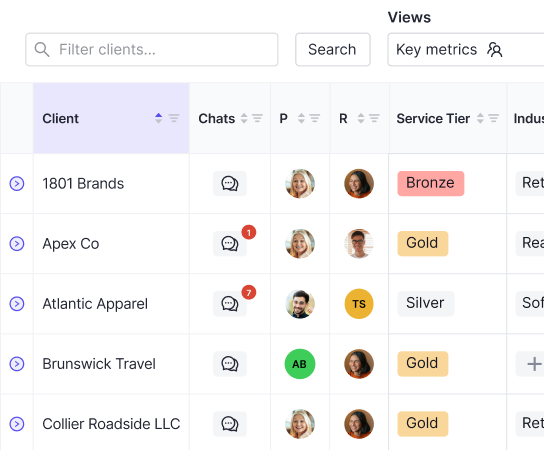
- Client portal for questions, document requests, and W-9 collection without email threads
- Real-time two-way sync with QuickBooks Online
- Accruals, AI journal entries, and reconciliation tools built directly into the close workflow
- Practice-wide dashboard showing where every client close stands at a glance
- Per-client pricing at $10, $25, or $50 monthly with no user fees
Pricing
Tier | Price | Best For |
|---|---|---|
Core | $10/client/mo | Cash-basis bookkeeping |
Plus | $25/client/mo | Complex transaction volumes, receipt management |
Scale | $50/client/mo | Accruals, advanced workflows |
Firms using Double report 30-50% time savings per close. You can start with a handful of clients and scale without enterprise minimums or per-user penalties as your team grows. Tightening up the month-end close process with integrated systems is one of the most effective ways to boost accuracy and speed in financial reporting.
Method CRM
Method CRM offers a patented integration that syncs customers, invoices, payments, and more between the CRM and QuickBooks in real time. It supports both QuickBooks Online and QuickBooks Desktop, which is worth noting since Desktop support is less common.
What They Offer
- Track opportunities, create estimates, and convert leads to QuickBooks customers in one click
- Customer portal for 24/7 access to update information, view estimates, and pay invoices
- Fully customizable workflows tailored to specific business processes
- Real-time two-way sync that updates QuickBooks when records are added or edited in Method
Good for businesses that need extensive workflow customization and are willing to invest in configuration services to get there.
The catch is that customization comes through Method's own team, which introduces implementation complexity and ongoing vendor dependency. If your workflows are unusual, expect a setup process before anything feels native to how you operate.
Method also focuses primarily on sales pipeline management instead of executing accounting work inside the workflow itself. For QuickBooks users running a traditional sales process, that works fine. For accounting firms that need to close books, collect documents, manage accruals, and communicate with clients inside one system, Method does not go that far.
Zoho CRM
Zoho CRM is a cloud-based sales CRM built to manage sales pipelines, marketing, and customer support. The QuickBooks integration extends that into finance by syncing invoice and contact data between the two tools.
Here's what the integration covers:
- Bidirectional sync of invoices, contacts, customers, products, and items between Zoho CRM and QuickBooks Online
- Invoice status tracking from QuickBooks directly inside Zoho CRM, including overdue, due, and paid invoices
- Historical sync for contacts and products within specific date ranges
- Integration available through Zoho Flow, Zapier, or marketplace extensions
The limitations are real, though. QuickBooks integration is only available on the Enterprise edition, locking out lower-tier plans entirely. The connection also runs through third-party extensions instead of a native integration, adding friction and potential sync reliability issues. For bookkeepers managing dozens of QuickBooks clients through month-end close, this is a general-purpose sales tool being pulled into a job it wasn't designed for.
Salesforce
Salesforce connects with QuickBooks to share customer records, sales orders, expenses, and invoicing data across your sales and finance teams. The setup requires middleware.
There are a few ways the integration works in practice:
- Integration runs through MuleSoft (Salesforce's recommended connector) or third-party AppExchange apps like DBSync
- No direct integration path between Salesforce and QuickBooks exists natively
- Bidirectional sync is available through configured field mapping and workflow automation
- Multiple integration tiers are available depending on data complexity
Good for enterprise sales organizations already committed to the Salesforce ecosystem who need basic QuickBooks visibility for their reps. Every sync requires a third-party vendor in the middle, which means extra cost, extra contracts, and extra points of failure.
HubSpot CRM
HubSpot's QuickBooks integration syncs contacts, products, and invoices between the two tools for sales and support teams.
- Native data sync for contacts, products, and invoices with QuickBooks Online
- Workflow actions to automate invoice, estimate, and sales receipt creation
- Basic invoice visibility within HubSpot for sales follow-up
Worth noting: workflow actions require a Professional subscription tier and are only available for US-based customers. HubSpot is a marketing and sales tool, not a deal management system.
Insightly
Insightly connects to QuickBooks Online natively, syncing contacts, invoices, and payment status so sales reps can see account standing without switching tabs.
What They Offer
- View invoices, payments, and financial summaries from QuickBooks directly inside contact records
- Create QuickBooks customers from CRM contacts without duplicate data entry
- Kanban boards, Gantt charts, and workflow automation for visual project tracking
- Bidirectional sync for contacts and invoice history
Good for service businesses and agencies needing CRM-to-project continuity with basic QuickBooks invoice visibility.
For accounting tools beyond QuickBooks Online, Insightly requires Zapier or AppConnect middleware, which starts around $249/month on top of CRM licensing. Insightly is built for service delivery projects, not for firms executing month-end close across multiple client QuickBooks files. Accounting teams need close execution, client communication, and reconciliation tools built into the workflow. Insightly does not go there.
Feature Comparison Table of CRM Systems That Integrate With QuickBooks
Here's how each tool stacks up across the features that matter most for QuickBooks-connected workflows.
Feature | Double | Method CRM | Zoho CRM | Salesforce | HubSpot CRM | Insightly |
|---|---|---|---|---|---|---|
QuickBooks Online Integration | Yes | Yes | Yes | Yes | Yes | Yes |
QuickBooks Desktop Integration | No | Yes | Yes | Yes | No | No |
Real-Time Bidirectional Sync | Yes | Yes | Yes | Yes | Yes | Yes |
Built for Accounting Firms | Yes | No | No | No | No | No |
AI Bank Feed Automation | Yes | No | No | No | No | No |
Close Execution Within Tool | Yes | No | No | No | No | No |
Client Portal | Yes | Yes | No | No | No | No |
Per-Client Pricing | Yes | No | No | No | No | No |
Accruals Management | Yes | No | No | No | No | No |
Multi-Client Dashboard | Yes | No | No | No | No | No |
Yes | No | No | No | No | No | |
Requires Customization | No | Yes | No | Yes | No | No |
Native Integration (No Middleware) | Yes | Yes | No | No | Yes | Yes |

Most tools share basic sync capabilities. Where they diverge is on execution depth: only Double is built to actually run close workflows instead of only displaying QuickBooks data alongside a contact record.
Why Double is the Best CRM System That Integrates With QuickBooks
Every tool in this list can sync a contact to QuickBooks. What they can't do is run the close itself.
Double is the only option built for accounting and bookkeeping firms that need to execute QuickBooks work instead of only displaying it. Bank feeds, reconciliations, accruals, client communications, and close sign-offs all happen inside one system. When your task list is complete, QuickBooks is already updated.
The per-client pricing fits how firms actually bill. If contact syncing is all you need, there are cheaper options. But if you want to close books faster across a full client roster, Double is the clear choice.
Final Thoughts on Choosing a QuickBooks CRM
CRM software that works with QuickBooks should do more than mirror contact data between two systems. For accounting firms managing multiple clients, you need close execution built into the tool so reconciliations, accruals, and client communications happen where your data actually lives. Double is the only option designed around that workflow, with per-client pricing that scales without penalizing team growth. Book a demo if you want to see how it runs for your specific client roster.