
Basis alternatives split into two types: workflow tools that track the close, and close automation tools that execute it. If your current setup is great at tracking the close but not executing it, there are better-fit options worth knowing about.
TLDR:
- Basis works well for tax-focused firms but keeps close work (reconciliations, flux analysis, journal entries) outside the product in spreadsheets
- Most Basis alternatives fall into two categories: practice management tools that track workflow, and close automation tools that execute the work itself
- Karbon, Canopy, Jetpack, Pixie, and Financial Cents all manage the process around the close, leaving the accounting work in your existing tools
- Pricing structure matters as much as features: most tools charge per user, so costs scale with headcount instead of client volume
- Autoclose hands the work of the close to AI agents that pull statements, code bank feeds, and reconcile accounts, with the firm reviewing and signing off, backed by two-way QuickBooks Online and Xero sync, AI flux analysis, and per-connected-client pricing; firms using Double report saving 30 to 50 percent of close time per close
What Is Basis and How Does It Work?
Basis is accounting software built for CPA firms and accounting practices. It combines general ledger functionality with client accounting features, positioning itself as an all-in-one solution for firms that want to consolidate their tech stack under one roof.
The core idea behind Basis is straightforward: instead of stitching together a separate general ledger, practice management tool, and client communication layer, firms get those capabilities in a single product. Basis handles bookkeeping workflows, financial statement preparation, and some client-facing deliverables from within the same system.
In practice, Basis tends to appeal to smaller firms and solo practitioners who want to reduce the number of subscriptions they manage. The workflow typically looks like this:
- Client data flows into Basis through direct connections or manual imports, where it sits inside the system's proprietary ledger and does not sync back to a client-owned system like QuickBooks Online or Xero.
- Accountants work inside Basis to categorize transactions, manage chart of accounts, and prepare financials.
- Reports and deliverables are generated from within Basis and shared with clients through the tool's built-in outputs.
The limitation worth noting is structural. Because Basis runs its own ledger, firms that manage clients already using QuickBooks Online or Xero face a friction point: the client's books live in one system, the accountant's work lives in another, and keeping the two in sync requires ongoing effort. For firms scaling a multi-client close practice, that architectural choice creates real drag at month-end.
Why Consider Basis Alternatives?
Basis is a well-regarded accounting workflow tool, and many firms use it productively for tax return management and client document collection. That said, a few structural patterns lead firms to start looking elsewhere.
- The close workflow sits outside the product. Basis organizes client tasks and document requests well, but the actual month-end close work (reconciliations, flux analysis, accruals, journal entries) happens in spreadsheets or separate tools. That creates a gap between client communication and the work itself.
- Multi-client visibility is limited. Firms managing 20, 50, or 100+ concurrent closes need a single view of where every client stands at any moment. Without that, managers are chasing status updates instead of reviewing work.
- AI capabilities are narrow. Basis uses automation for reminders and intake, but stops short of accounting automation for reconciliation, variance explanation, or automated journal entry preparation, which are the tasks that now consume the most staff time in a close cycle.
- Pricing scales in ways that affect margin. As firms grow their client base, per-user or per-feature costs compound quickly. Firms running lean teams across many clients feel this acutely.
None of these are reasons to dismiss Basis outright. For tax-focused firms with lighter close demands, it may still fit well. But for firms where the month-end close is central to their CAS or advisory practice, the gaps above tend to drive the search for something built differently.
Best Basis Alternatives in November 2026
Basis is one of the more recognized names in accounting firm software, particularly known for its client accounting services (CAS) and bookkeeping workflow features. Firms that have outgrown it, or simply want to see what else is available, often find the search confusing because the category spans everything from task trackers to full close automation tools, and the best client management software covers a wide range of firm needs.
The six alternatives below were assessed using published documentation, user reviews, and verified feature claims, benchmarked against what accounting firms actually need from a close management and CAS workflow solution.
Double
Double is built for accounting firms running multi-client close workflows. Where most tools in this space ask you to manage the close as a project, Double executes the work itself: AI-assisted reconciliations, flux analysis, accruals, and client communication all run inside a single workflow connected directly to your general ledger.
The integration is two-way with QuickBooks Online and Xero, meaning reconciliation results and journal entries post back to the ledger without manual re-entry. For accounting firms managing concurrent client closes, whether five, fifteen, or fifty, that removes the copy-paste layer entirely.
- Autoclose, launched October 26, 2026, lets firms hand the work of the close to AI agents that fetch bank and card statements (including from sites with no integration), code bank feeds using each client's rules and history, and reconcile accounts on the firm's schedule, so review is the first and last step and the team signs off on every close. It works best with QuickBooks Online today.
- AI-driven bank reconciliation that matches transactions and flags exceptions, not a blank worksheet handed over for manual comparison
- Flux analysis that automatically drafts variance explanations at the vendor and transaction level across your P&L and balance sheet, with configurable materiality thresholds
- Accruals and prepaids management covering prepaid amortization, fixed asset depreciation, deferred revenue, and loan amortization schedules, with journal entries calculated and posted automatically
- A client-facing portal for document collection, approvals, and status visibility, replacing the email thread that typically surrounds month-end
- Multi-client dashboard giving firms a single view across all active closes, so nothing falls through during a busy period
Firms using Double report saving 30 to 50 percent of close time per close. Pricing runs per connected client with no per-user or per-seat fees, which keeps costs predictable as client volume grows.
Double fits firms where tax prep, audit, and advisory all run concurrently and the close needs to move fast without adding headcount.
Karbon
Karbon has earned its place as a widely adopted practice management tool for accounting firms. It handles workflow assignment, job tracking, email collaboration, and client task management across the firm. Trustpilot reviews reflect its strong workflow reputation, with firms citing team organization and deadline tracking as consistent strengths.
The limitation worth noting is structural. Karbon was designed as a practice-wide coordination layer, not a close execution tool. Reconciliations, flux analysis, and journal entry preparation happen outside Karbon in your existing tools, then get tracked inside it. For firms whose primary pain point is the close itself and not task visibility, that gap is meaningful.
Karbon works well for firms that want a single hub for managing all service lines, deadlines, and team assignments. It is less suited for firms looking to automate the accounting work inside the close.
Jetpack Workflow
Jetpack Workflow is a workflow and job management tool built for small to mid-sized accounting firms. It covers recurring job scheduling, task assignment, due date tracking, and a client list with job history.
The core limitation is the same as Karbon's: Jetpack manages the workflow around the close, not the close itself. There is no ledger connection, no reconciliation engine, and no AI-assisted variance analysis. For firms that need visibility into who is doing what and when, it fills that gap. For firms that want the accounting work to move faster, it does not resolve the underlying bottleneck.
Canopy
Canopy positions itself as an all-in-one practice management solution with modules covering CRM, document management, time and billing, and workflow. It has a broader feature surface than pure workflow tools and is used by a range of firm sizes.
G2 reviewers cite sync errors and slow support response as recurring reliability concerns (G2, 2025). The product has improved over several release cycles, but the concerns appear consistently enough to factor into evaluation for firms where close deadlines are non-negotiable.
Canopy covers firm operations broadly. Firms focused on accelerating the month-end close will find its accounting-specific automation thinner than dedicated close tools.
Pixie
Pixie is a practice management tool built for smaller accounting and bookkeeping firms. It covers job tracking, client records, recurring task templates, and basic workflow automation.
It is approachable and priced accessibly for solo practitioners and small teams. The tradeoff is depth: Pixie does not connect to your general ledger, and there is no reconciliation, accruals, or financial analysis functionality. For firms at the stage where a spreadsheet is the current system and a structured workflow tool would represent a meaningful step forward, Pixie makes sense. For firms looking to cut close time through automation, it is not the right fit.
Financial Cents
Financial Cents is a workflow management tool aimed at bookkeeping and accounting firms. It covers client management, recurring workflows, task tracking, time logging, and a client portal for document collection.
The tool is well-regarded for its ease of setup and clean interface, particularly among smaller firms. Like the other workflow-focused tools in this list, Financial Cents manages the process around the accounting work without executing the accounting work itself. Firms using it will still handle reconciliations, journal entries, and variance analysis in their existing tools. The client portal and workflow automation are genuine strengths for firms whose main friction is client communication and job visibility, not close speed.
Feature Comparison: Basis vs. Top Alternatives
Each tool was assessed on the capabilities that matter most to accounting firms running multi-client close workflows: ledger integration depth, AI automation, client communication, and pricing structure. The table below maps how Basis stacks up against the top alternatives across those dimensions.
Feature | Basis | Double | Karbon | Jetpack Workflow | Canopy | Pixie | Financial Cents |
|---|---|---|---|---|---|---|---|
Primary use case | Month-end close | Month-end close + Autoclose AI agents | Practice management | Workflow & job management | Practice management | Practice management (small firms) | Workflow management |
Ledger sync | QuickBooks Online (import only, no two-way sync) | QuickBooks Online, Xero, Sage Intacct, NetSuite (two-way) | None | None | None | None | None |
AI automation | Limited | Autoclose agents, flux analysis, transaction categorization, journal entries | None | None | None | None | None |
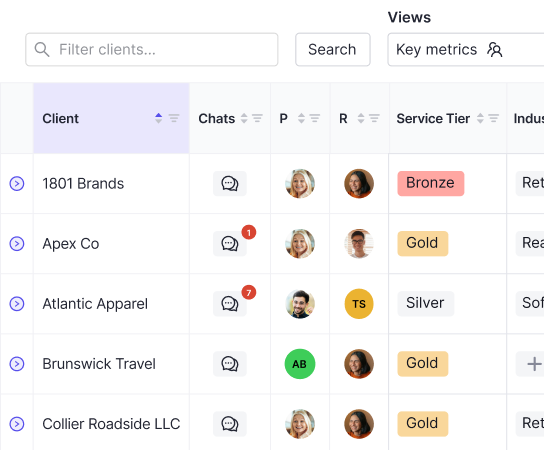
Multi-client dashboard | Yes | Yes | Yes | Yes | Yes | Yes | Yes |
Client portal | No | Yes | Yes | No | Yes | No | Yes |
Reconciliation workpapers | Yes | Yes | No | No | No | No | No |
Pricing model | Per user | Per connected client | Per user | Per user | Per user | Per user | Per user |
Built for accounting firms | Yes | Yes | Yes | Yes | Yes | Yes | Yes |
A few things stand out from this comparison.
Ledger sync depth matters more than it sounds
Basis imports from QuickBooks Online, which covers a large share of small business clients, but it does not offer two-way sync back to the client's ledger. Double adds Xero, Sage Intacct, and NetSuite through two-way sync, meaning journal entries post back to the ledger automatically with no manual export and import cycles required. For firms whose client base includes a mix of QBO, Xero, and mid-market ERP users, that integration breadth reduces the number of manual handoff points in each close.
AI automation is where the gap widens
Basis offers limited AI functionality relative to what dedicated close automation tools now support. Autoclose hands statement pulls, bank feed coding, and reconciliations to AI agents that run on a schedule or trigger and show every step along the way. Double's AI flux analysis then drafts variance explanations at the vendor and transaction level across the P&L and Balance Sheet, with configurable materiality thresholds. Its AI transaction categorization and automated journal entries handle the data prep work so accountants spend time reviewing conclusions and keep full judgment over the close. Karbon and Canopy are primarily practice management tools and do not offer close-specific AI automation at this level.
Beyond the close itself, Ask Double extends that AI layer across the entire practice, answering cross-client questions, querying ledger data on demand, and creating and assigning tasks directly from conversation, all with full audit logging and permission controls. Instead of replacing accountant judgment, Ask Double handles the retrieval and coordination work so practitioners stay focused on review and client relationships. It is included on Core, Plus, and Scale plans for QuickBooks Online practices.
Practice management tools solve a different problem
Karbon vs Double is a common comparison, and Karbon alongside Canopy appear on many accounting firm software lists because they handle client onboarding, document collection, pipeline tracking, and billing well. The limitation worth noting is structural: neither was built for month-end close execution. They track that the close is happening, but the actual reconciliation work, flux analysis, and journal entry preparation happen outside the tool in spreadsheets or the ledger itself. Firms comparing those two should be clear about whether they need close management software for accounting firms or practice workflow coordination, because those are distinct problems with distinct tooling.
Pricing structure affects scalability
Basis and most competitors price per user, which means costs scale with headcount instead of client volume, a key differentiator when selecting financial close management software for accounting firms. Double prices per connected client with no user fees, which creates a different cost curve: adding staff does not increase the software bill, and the per-client model ties cost directly to revenue-generating activity.
Why Double Is the Best Basis Alternative
Accounting firms searching for Basis alternatives need a solution built for multi-client close workflows, not a corporate finance tool retrofitted for firm use. Double was built from the ground up for accounting firms managing concurrent client closes, and the architecture reflects that from the first login.
Where Basis requires manual coordination across disconnected tools, Double runs the entire close inside a single workflow, with two-way sync to QuickBooks Online and Xero. Every transaction, reconciliation, and journal entry posts directly back to the ledger without a separate export step.
What Double Covers
- Autoclose, which hands the close to AI agents that pull statements, code bank feeds, and reconcile accounts on the firm's schedule so the team starts every close at review and signs off themselves; agents run on a schedule or trigger, and the firm can see every step and stop any run.
- Two-way ledger sync with QuickBooks Online and Xero, so changes made inside Double reflect immediately in the client's books without manual re-entry or file transfers.
- AI-powered bank reconciliation that matches transactions automatically, flags anomalies, and surfaces unreconciled items before they become close-day surprises.
- Accruals and prepaids management that handles prepaid expense amortization, fixed asset depreciation, deferred revenue, and loan amortization schedules directly inside the close workflow. Double calculates recognition amounts, prepares the journal entries, and posts them automatically.
- AI flux analysis that automatically drafts variance explanations at the vendor and transaction level for your P&L and Balance Sheet, with configurable materiality thresholds and depth settings, so reviewers start from conclusions instead of rebuilding variance stories from scratch.
- A client portal for document collection, approvals, and communication, keeping every client interaction tied to the close it belongs to.
- Multi-client portfolio visibility so managers can see close status across every client in one view, without opening each engagement individually.
Pricing That Scales With Your Book of Business
Double charges per connected client with no user fees. Autoclose is a firm-level add-on, and clients run on Autoclose are on the Scale plan. Firms using Double report saving 30 to 50 percent of close time per close. As your client count grows, the cost scales predictably without adding per-seat fees for every staff member who touches a file.
For contracts over ten clients, hands-on three-month implementation is included in the price.
For a direct feature breakdown, the Double vs TaxDome comparison covers how both tools handle close workflows for accounting firms. Double fits firms where tax prep, audit, and advisory all run simultaneously and the close has to move fast across every client at once.
Final Thoughts on Choosing a Basis Alternative
Choosing between these tools comes down to one question: do you need help organizing the close, or do you need help executing it? Workflow tools cover the first problem well. Double covers both. If your close is the bottleneck, book a demo to see how the automation works across a real multi-client workflow.